|
This document outlines the requirements
for CFXGraphicsServer. It is recommended that installation should be done using
the supplied installation program.
Files installed...
Required...
| File |
Location |
| GSWAG32.DLL |
System32
|
| GSWDLL32.DLL |
System32 |
| GSPROP32.DLL |
System32 |
| GSPNG32.DLL |
System32
|
| GSGIF32.DLL (optional) |
System32 |
| GSJPG32.DLL |
System32 |
| CFXGraphicsServer.DLL |
... \ CFusion \
CustomTags |
Not Required...
| File |
Location |
| wgsocx.ocx |
System32
|
| CFXGRPAHICSSERVER.VTM |
... \ ColdFusion
Studio \ Extensions \ TagDefs \ CFML |
| CFXGRPAHICSSERVER.TBR |
... \ ColdFusion
Studio \ UserData \ Toolbars |
Registry Entries
CFXGraphicsServer uses the system
registry to hold long term as well as day-to-day (or graph-to-graph) values.
They are as follows:
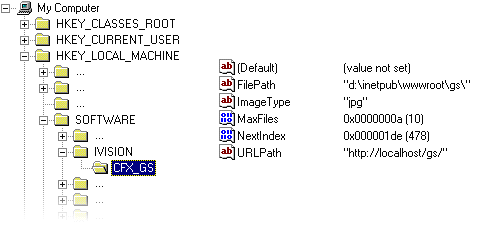
FilePath
This specifies the temporary
directory into which all the graphs are written awaiting transmission by
the server. This directory must have public read access and local write
access.
In the above screenshot, I have
used the directory 'd:\inetpub\wwwroot\gs\'. This directory has local write
access, so that CFXGraphicsServer can write graphs to it. It also has web
sharing enabled, and it shard as 'gs'.
ImageType
This specifies the image type
to use. It may one of "jpg", "png" or "gif".
If any other value is specified then no graphs will be written.
MaxFiles
This specifies the maximum number
of files to hold in temporary storage at any one time. If this is set too
low then you risk removing temporary files before they have been transmitted.
If it is too high you will use excessive disk space up. As a general guide,
it should be set to the number of graph requests expected per 5-10 minutes.
NextIndex
This is maintained by CFXGraphicsServer,
and is initialised to 0 on installation.
URLPath
This is the public path
to the temporary directory. It should be of the form 'http://...'. In the
above screenshot this value is set to 'http://localhost/gs' - this is what
'd:\inetpub\wwwroot\gs' is shared as.
It is important to note that
you should never use 'localhost' in this value, as this restricts
access to clients on the server, but should always refer to the machine
by it's full name.
ColdFusion Registration...
The CFX needs to be registered with
ColdFusion administrator. The administrator can be found in the ColdFusion Server
group on the Windows Start Menu.
For more information on how to use
the administrator, consult the ColdFusion Server reference material.
The correct details for CFXGraphicsServer
are....
| TagName |
CFX_GraphicsServer |
| Server library (DLL) |
... \ CFusion \ CustomTags \
cfxgraphicsserver.dll |
| Procedure |
ProcessTagRequest |
| Keep library loaded |
Yes |
Toolbars...
In order to use the toolbar button
for CFXgraphicsServer, the following modifications need to be made...
in ... \ ColdFusion Studio \ UserData
\ Toolbars \ Ctoolbar.pos
add the following lines to the end of the file...
[CFXGraphicsServer]
Rev=2
Visible=1
DockedTo=dockTagBarCFXGraphicsServer
DockRow=0
DockPos=0
FloatLeft=0
FloatTop=0
FloatRightX=0
in ... \ ColdFusion Studio \ UserData
\ Toolbars \ quickbar.dat
add a line to the end of the file ...
cfxgraphicsserver.tbr
|