| 1. Create a project directory.
For example "c:\inetpub\cfxgraphicsserver" |
| 2. Within this directory
create two subdirectories; "Datasource" and "WWWRoot".
The datasource directory will be used to hold the database, and the
WWWRoot directory to hold the web pages using the datasource. |
3. Open Access, a dialog
box will appear, select the check box to create a blank database.
Save the blank database as MyDb.mdb to the directory ..inetpub/CFXGraphicsServer/datasource/.
|
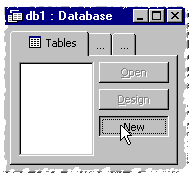 4.
You will now be presented with main database management window. Click
on the 'tables' tab and then the 'new button'. This will create a
new table within your database. Select the design view. 4.
You will now be presented with main database management window. Click
on the 'tables' tab and then the 'new button'. This will create a
new table within your database. Select the design view. |
|
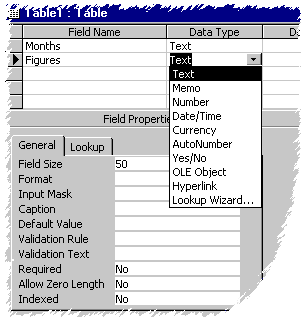 4.
In the design view type 'month' in the 'Field Name' column
and in the corresponding 'Data Type' column select text from the
drop down combo. 4.
In the design view type 'month' in the 'Field Name' column
and in the corresponding 'Data Type' column select text from the
drop down combo.
Now right click anywhere
over the row and select 'Primary Key' from the menu that appears.
The Primary key allows
the database to assign a unique ID to each record in your database.
In this case it uses the text in Month for the IDs.
|
| 5. On the second row type
'figures' and select 'number' as the Data Type. |
| 6. Save the file as Sample
and close the design view. |
| 7. Select the table tab
and double click on 'Sample'. This opens the table, enter the months
Jan to Dec in the months' column, enter data in steps of 5 in the
figures column. |
| 8. Save the table |